

Android Phone’s mostly uses phone’s now-days. most of the people who thinks like developer’s already root his/her phone’s to get all the function’s of your android but some of the people never know what you will get after rooting any android phone so read here Why Root Android Phone. if you want to root any android phone read here How To Root Any Android Phone. after rooting your phone works like awesome and speed up you can edit many things after rooting but one thing is after root your android phone your phones warranty will be void but don’t worry there is always a way so here is I gonna show you How To Unroot Any Android after rooting so I gonna show you all working method’s to unroot any android phone.
How To Unroot Any Android
Method 1.
This will work for about 99{57181bbf5cc082174a7d52e7bd600fcabcc97a45aa48fb7ad3fe13f7b8aed626} of all Android device so chances are that it will work for your phone.
- Open ES File Explorer
Tap on Otptions > Settings > Check mark “Root Explorer” > Check mark “Mount File System”
Go back and tap the favorite (located on top of the screen) and tap the “/”.
Go to “System” > “Bin” > Delete “uus”(If you can’t find the su file it’s okay. Not all su files are put here)
Go back to “System” > “Xbin” > Delete “su” You might have it in “Bin”,”Xbin” or in both places. As long as you have it in 1 of the places your fine.
Go back to “System” > “App” > Delete “SuperUser” apk. You are now unrooted!
Method 2.
if you have a custom recovery installed, it will not remove that (you will have to re-install stock recovery or re-install stock firmware), but this will remove the root completely for devices that only have root installed. (E.g. if you have a rooted Droid Razr or One X and rooted without installing a custom recovery, this method will completely unroot your device and return it to stock.
Step 1.
If you have SuperSU app already (many root methods use SuperSU), you can skip this step. If you have SuperUser app installed, download and install SuperSU app (free) from Play Store.
Step 2.
Run the SuperSU app, go to Settings, and choose “Full unroot”. That’s it! You can reboot your phone and should find your Android device completely unrooted. If you still see SuperSU or Superuser app in your drawer, simply uninstall using Play Store.
Method 3.
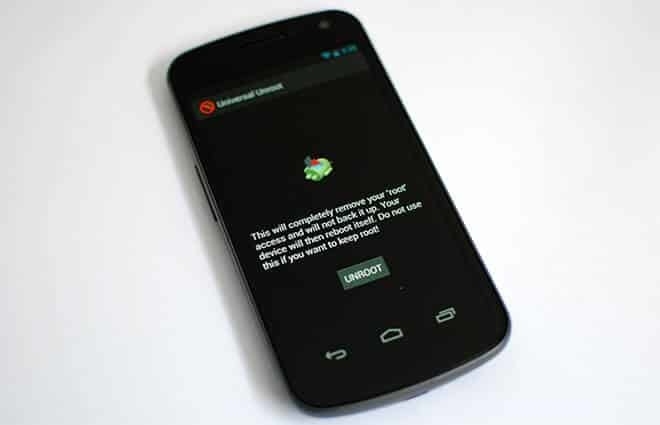
Universal Unroot is the one root access removal app to un-root any Android device. Just you have to click on the un-root and your device gets un-rooted. At this moment, this app only supports x86, ARM and MIPS based devices.


9 responses
HI,
thanks for the explained guide. 🙂
I was recommended this webb sikte bby my cousin. I am not sure whether this post is written by him as
nobody else know such detailed about my trouble. You aare incredible!
Thanks!
hey bro please tell me, how can i open rar password file? and i just forget the password
Hi i have Intex Aqua 3.2 android phone which has 2.3.6 gingbread version. i want toupgrade it , so plz help me to upgrade this phone to jelly bean.
Hello,
Actually i purchased an android mobile recently and was gathering the useful stuff. The post is really informative.
thanks for sharing.
Hi Prince,
What an impressive tutorial, this is one of the question sky-rocketing most of the forum and this is indeed direct answer to this question.Thanks for sharing this self explanatory tutorial.
It is really nice of you.
Hey nice info bro..thanks a lot for sharing..Sorry but I am not getting that “xbin” option ?? can you please tell me more in detail ? thanks
Hey Prince, its a very impressive Article. you have mentioned 3 method for – How To Unroot Any Android,which are awesome. thanks again for sharing unique ideas.