

To schedule a message on WhatsApp, open a chat, type your message, then press and hold the Send button (the paper plane). Pick the date and time, and tap Send. You can schedule from 10 minutes to 14 days ahead, in one-on-one and group chats, on iPhone and Android. The feature started rolling out on November 25, 2026, so update WhatsApp if you don’t see it yet.
Until this week, WhatsApp had no built-in way to send a message later. That changed on November 25, 2026, when WhatsApp announced scheduled messages as a built-in feature and called it one of its most requested. Here’s how to schedule a message on WhatsApp, how to find and delete the ones you’ve lined up, and what to do if the option isn’t showing. Every step below comes from WhatsApp’s own blog and Help Center, checked on November 26, 2026.
Can you schedule a message on WhatsApp now?
Yes. According to WhatsApp’s announcement, you can write a message now and have it sent anywhere from 10 minutes to 14 days later. Here’s what WhatsApp says about it:
- It works in both one-on-one chats and group chats.
- You can schedule text, photos and videos.
- The message looks like any other message to the person who gets it.
- It still arrives at the time you picked even if your phone is off or the battery is dead.
- Scheduled messages are end-to-end encrypted, like your other personal messages.
The catch: WhatsApp says the feature is rolling out globally over the coming weeks. So you might not see it right away, even if a friend already has it.
How to schedule a message on WhatsApp (iPhone and Android)
WhatsApp’s Help Center article lists the same steps for iPhone and Android:
- Open the one-on-one or group chat you want to message.
- Type your message as usual. Don’t tap Send yet.
- Press and hold the Send button (the paper plane icon).
- Scroll to choose the date and time you want the message to go out.
- Tap the Send button under the picker. It names the time you chose, for example “Send tomorrow at 10:00 AM”.
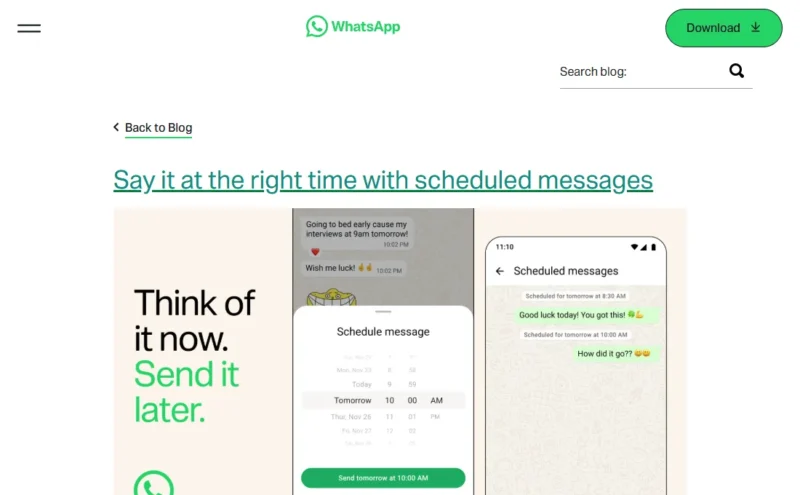
WhatsApp’s announcement image (above) shows both screens: the Schedule message picker with a day, hour and minute wheel, and the Scheduled messages list, where each message is labeled with when it will go out.
Scheduling in a group chat
Groups have one rule worth knowing. WhatsApp’s help article says a scheduled message only goes to the people who were in the group when you drafted it. Anyone who joins after you schedule it won’t see it. If you’re adding people to a party or trip group, add them first, then schedule the reminder.
How to see and delete scheduled WhatsApp messages
WhatsApp keeps your future messages in a Scheduled messages list, so you can check what’s coming up. The steps from the Help Center:
To view them:
- Tap your profile picture.
- Tap Scheduled messages.
To delete one:
- Tap your profile picture, then Scheduled messages.
- Press and hold the message you want to delete.
- Tap Delete.
WhatsApp’s help page lists viewing and deleting, but not editing. If you need to change the text or the time, delete the scheduled message and schedule a new one.
Why can’t I schedule a message on WhatsApp?
If pressing and holding Send doesn’t bring up a date and time picker, one of these is usually the reason:
- It hasn’t reached your account yet. WhatsApp is rolling it out over several weeks, so it can show up for a friend before it shows up for you.
- Your app is out of date. 9to5Mac reported that the feature came with the WhatsApp update released on November 25. Update the app (steps below).
- You’re using WhatsApp Business. WhatsApp’s help article says scheduled messages are not available in the WhatsApp Business app for now.
- The time is outside the window. WhatsApp says you can schedule from 10 minutes to 14 days ahead. A message for 5 minutes from now, or for next month, won’t work.
- You’re on a computer. WhatsApp’s help article only gives steps for Android and iOS, so schedule from your phone.
How to update WhatsApp
WhatsApp’s update guide says the newest versions bring new features and bug fixes, and recommends backing up your chats and using a strong internet connection before you update.
- iPhone: find WhatsApp Messenger in the Apple App Store and tap Update.
- Android: find WhatsApp Messenger in the Google Play Store and tap Update.
If you’re already on the latest version and still don’t see it, the rollout just hasn’t reached your account yet. Check again in a few days.
Scheduled messages vs. other ways to send later
WhatsApp has a few features that sound similar. Here’s how they compare, based on WhatsApp’s Help Center pages for scheduled messages, Meta AI tasks, away messages and unofficial apps:
| Option | What it does | Who it’s for | Safe to use? |
|---|---|---|---|
| Scheduled messages | Sends your message to a chat or group at a time you pick, 10 minutes to 14 days ahead | Regular WhatsApp on iPhone and Android | Yes, built in and end-to-end encrypted |
| Meta AI tasks | Meta AI sends you a reminder or a briefing at a set time | People who want a reminder to send something themselves | Yes, built in, but Meta AI is only available in some countries |
| Away messages | Auto-replies to customers who message you, always or on a schedule | WhatsApp Business app only | Yes, built in |
| Unofficial apps (GB WhatsApp, FM WhatsApp and similar) | Versions of WhatsApp made by third parties without WhatsApp’s approval | Nobody | No. WhatsApp says they break its Terms of Service |
Should you still use a scheduling app?
Now that scheduling is built in, there’s little reason to. WhatsApp’s page on unofficial apps says using them, or linking your account to them, violates its Terms of Service. It warns that they may carry malware, that your messages and data may not be private, and that your account could be temporarily or permanently banned. WhatsApp names GB WhatsApp, FM WhatsApp, TeleMessage and TM WhatsApp as examples.
Add Being Tricky on Google:
If someone sends you a link to a “WhatsApp scheduler” or a modded WhatsApp download, treat it like any other suspicious link. Our guide on how to spot a phishing link shows what to check before you tap.
If you just want a nudge rather than an automatic send, an AI assistant can help too. Google’s Gemini can now take on tasks by text message in the US, as we explain in how to text Gemini.
Frequently asked questions
Can you schedule a text on WhatsApp?
Yes. Since November 25, 2026, WhatsApp has a built-in scheduled messages feature. Type your message, press and hold the Send button, pick a date and time, and tap Send. It is rolling out over a few weeks.
How far ahead can you schedule a WhatsApp message?
Up to 14 days (two weeks). The earliest you can schedule is 10 minutes from now, according to WhatsApp.
Will the other person know my message was scheduled?
WhatsApp says a scheduled message looks like any other message to the person receiving it.
Does a scheduled WhatsApp message send if my phone is off?
Yes. WhatsApp says the message still shows up at the time you chose even if your phone is off or out of battery.
Can I schedule messages in WhatsApp Business?
Not yet. WhatsApp’s help article says scheduled messages are currently not available for WhatsApp Business. Business users can set away messages on a schedule instead.