
To text Gemini, open the Gemini app or gemini.google.com, tap Menu > Settings > Channels, then tap Set up next to Text with Gemini and verify your phone number. Gemini then sends you a text, and you can reply from Google Messages on Android or the Messages app on iPhone. You need a personal US Google Account in English, access to tasks in Gemini, a US number on an eligible carrier and RCS turned on.
Google started rolling out Text with Gemini on November 17, 2026, as part of a bigger update that made tasks in Gemini free for users in the US and five other countries. This week the feature started showing up inside Google Messages itself: 9to5Google reported on November 24 that the Gemini button in the latest Messages beta now opens the new texting setup. Here’s how to text Gemini, who can use it, what you can send, and how to turn it off. All steps come from Google’s own help pages, checked on November 26, 2026.
What is Text with Gemini?
Text with Gemini lets you send requests to Gemini as ordinary text messages. Google’s release notes describe it as a private 1:1 thread where you can hand over a task, send a photo of a school flyer so Gemini adds the dates to Google Calendar, or get scheduled check-ins. If your plans change while Gemini is working, you reply to the text to steer the task without starting over.
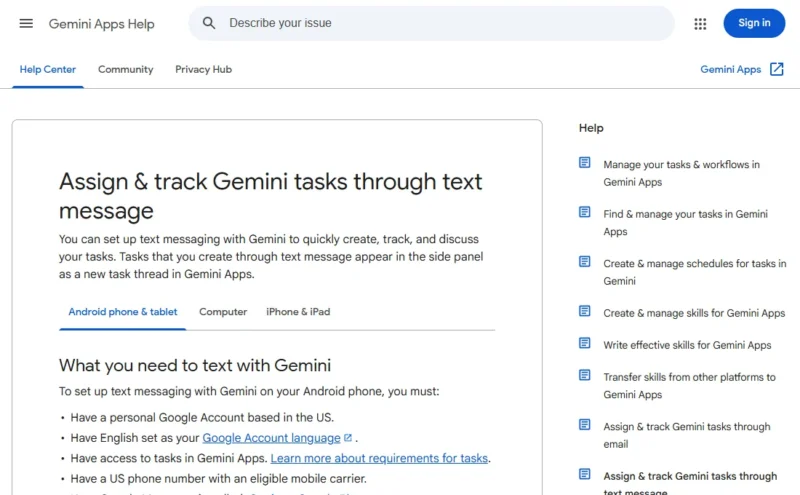
It’s built on tasks in Gemini, the feature that runs multi-step jobs in the background. According to Google’s help page, tasks you create by text show up in the side panel of the Gemini app as a new task thread, so you can also follow them in the Gemini app.Google says Gemini pauses for your one-tap confirmation before major actions such as sending or booking.
What you need to text Gemini
Google lists slightly different requirements for Android and iPhone. Here they are side by side, from the Android and iPhone versions of the help page and the tasks help page:
| Requirement | Android | iPhone |
|---|---|---|
| Google Account | Personal account based in the US | Personal account based in the US |
| Account language | English | English |
| Age | 18 or over | 18 or over |
| Tasks in Gemini | Access needed, with History on | Access needed, with History on |
| Phone number | US number with an eligible carrier | US number with an eligible carrier |
| Messaging app | Google Messages, same number and same Google Account as Gemini | Messages app |
| RCS setting | RCS chats on in Google Messages | RCS Messaging and RCS Business Messages on |
| Not available with | Work or school Google Accounts | Work or school Google Accounts, or the Advanced Protection Program (for now) |
Tasks in Gemini don’t need a paid plan in the US. Google’s tasks help page says they’re available without a Google AI subscription in Australia, Canada, India, Japan, South Korea and the US. Texting, though, is US-only for now.
How to text Gemini: set it up in Channels
You only do this once. The steps are the same on Android, iPhone and the web, according to Google:
- Open the Gemini app on your phone or tablet, or go to gemini.google.com.
- At the top, tap Menu.
- At the bottom, tap Settings, then Channels.
- Next to Text with Gemini, tap Set up.
- Pick the phone number you want to use, or tap Add a phone number.
- Verify your number if Gemini asks you to, and follow any other on-screen instructions.
- Wait for the first text from Gemini. That thread is now your chat with Gemini.
Google’s release notes also name gemini.google.com/channels as the place to opt in. The feature is still rolling out, so Channels may not appear on every account yet.
Turn on RCS on iPhone first
On iPhone, Google says you need two RCS switches on before you start. From the iPhone help page:
- Open the Settings app.
- Tap Apps > Messages > RCS Messaging.
- Turn on RCS Messaging.
- Turn on RCS Business Messages.
On Android, RCS chats need to be on in Google Messages settings, and you should be signed in to the same Google Account in both Gemini and Google Messages.
What can you text Gemini?
Once the thread is set up, Google says you can create a task, ask for a status update or talk about a task that’s already running. A few examples taken from Google’s announcements:
- Send a photo of a school flyer and ask Gemini to add the dates to your Google Calendar.
- Ask for a daily morning briefing based on your email and calendar.
- Ask Gemini to watch for a price drop on a flight or hotel within your budget.
- Reply mid-task to change the plan, for example a new date or a lower budget.
You can attach photos, files and your location. Each attachment can be up to 15 MB, according to the help page. Google’s tasks page also warns you not to type sign-in details, payment information or anything sensitive straight into a task thread.
Text with Gemini vs. Gemini in Google Messages vs. email
Google now has three ways to message Gemini, and they’re easy to mix up. Here’s how they differ, based on Google’s help pages for texting, email and Gemini in Google Messages:
| Text with Gemini | Email with Gemini | Gemini in Google Messages (older chat) | |
|---|---|---|---|
| Works on | Android and iPhone | Gmail, or Apple Mail and Outlook signed in with your Gmail account | Android only |
| Where | US only | US only | 165+ countries |
| What it does | Create, track and discuss tasks | Create tasks only | General chat: drafts, ideas, plans |
| How to start | Settings > Channels > Text with Gemini | Settings > Channels > Email with Gemini, then email gemini@google.com | Tap the Gemini chat in Google Messages |
| Attachments | Up to 15 MB each | Up to 10 per email | Photos |
| End-to-end encrypted | No | Not stated | No |
Email has extra rules: Google says it doesn’t support auto-forwarded emails, emails without gemini@google.com in the “To” field, or work and school accounts. Emailing about an existing task creates a new task.
Is texting Gemini private?
Not fully. Google states that texts with Gemini aren’t end-to-end encrypted and may be accessible by your carrier, under the carrier’s own privacy policy. Deleting your Gemini activity doesn’t delete the texts from your messaging app or carrier, and deleting the text thread doesn’t delete your Gemini activity. If you also want to keep your chats out of AI training, see our guide to turning off Gemini AI training.
How to stop texting Gemini
You have two options, both from Google’s help page:
- Pause texts: in your text thread with Gemini, send STOP. Send START to opt back in.
- Remove your number: go to Menu > Settings > Channels, and on the Text with Gemini card tap Remove next to your number, then Remove again.
To hide the older Gemini button in Google Messages on Android, Google’s Messages help page says to tap your profile picture, then Messages settings > Gemini in Messages, and turn off Show Gemini button.
Text with Gemini not working? Try these fixes
- “Numbers from my carrier aren’t supported”: Google says that, for now, Text with Gemini isn’t supported on some mobile carriers.
- Gemini texts you to sign in: make sure you’re signed in to the same Google Account in the Gemini app and Google Messages.
- Gemini asks you to verify again: this can happen after a new phone or SIM. Go to Settings > Channels, tap your number on the Text with Gemini card and follow the steps.
- You deleted the thread by mistake: go to Settings > Channels and tap Send text on the Text with Gemini card to start a new one.
- No Channels option at all: check that your account is personal, set to English, based in the US, and that Gemini History is on. Work and school accounts can’t use tasks yet.
Want Gemini to work with more of your apps? Our guide to Google Connected Apps explains what Gemini can reach, and if you’re moving over from ChatGPT, here’s how to import your ChatGPT history into Gemini.
Frequently asked questions
Can you text Gemini like a phone number?
Yes, in the US. After you set up Text with Gemini in Settings > Channels, Gemini sends you a text, and you reply in that thread from Google Messages or the iPhone Messages app.
Is texting Gemini free?
Google says tasks in Gemini, which texting is built on, are available without a Google AI subscription in the US.
Can I text Gemini from an iPhone?
Yes. Google’s iPhone help page lists the Messages app, with RCS Messaging and RCS Business Messages turned on. It isn’t available yet if you use Apple’s Advanced Protection Program.
How do I stop Gemini from texting me?
Send STOP in the text thread, or remove your number in Gemini under Settings > Channels > Text with Gemini.