
On November 20, 2026, Google started rolling out new Google Connected Apps in the U.S. that let you build a grocery order from Albertsons, Safeway, Shaw’s or Target, check your credit with Experian, and estimate a tax refund with H&R Block, right inside Search and the Gemini app. To use one, open AI Mode at google.com, type your request starting with @ and the app name, then link your account when Google asks. You can unlink any app later from your Google Account.
What Google announced
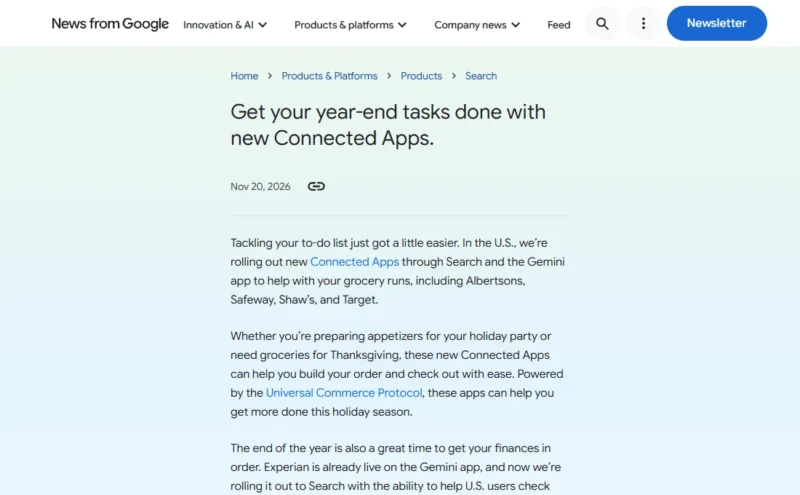
Google’s November 20 post lists three changes for U.S. users:
- Groceries: new Connected Apps for Albertsons, Safeway, Shaw’s and Target in Search and the Gemini app. Google says they help you build your order and check out. They run on Google’s Universal Commerce Protocol.
- Money: Experian was already in the Gemini app and is now rolling out to Search, where it can help you check your credit rating and shop for a personal loan. H&R Block can calculate your taxes and estimate your refund from Search.
- Coming soon: “in the coming weeks” you’ll be able to link Angi and Thumbtack accounts in Search to find local home-service pros. Both are already listed as Connected Apps in Gemini.
This builds on the Connected Apps program Google expanded on October 28, when it said more than 50 Connected Apps had launched across Search and Gemini.
How to use Google Connected Apps in Search
Google’s Search help page says Connected Apps work in AI Mode for now, and Google is starting to bring them to AI Overviews. You must be signed in to a Google Account.
- Go to Google Search on your computer or phone and select AI Mode. You can also go straight to google.com/ai.
- In the Ask anything bar, start your request with @ and the app name, for example: “@Target build a cart for a Thanksgiving dinner for six.”
- If the app isn’t connected yet, Google offers to connect it. Click Link and follow the steps to sign in to your account with that store or service. If it’s already linked, you’ll see a Continue option.
- Review what AI Mode puts together. To finish, Google may send you to the app itself, for example to check out and track a grocery order.
- To switch apps, name the one you want in your next request. Google says it may default to the last app you used for a task.
In the Gemini app, it works the same way: ask Gemini to do something in the app by name, or type @ and the app name. If you’re eligible and it isn’t connected, Gemini offers to connect it.
Who can use it
Google says app availability varies by age, country and language, and most apps need you to have an account with that service. Here is what Google’s Gemini availability table lists for the apps in this update that already appear there:
| App | Minimum age | Where | Account type |
|---|---|---|---|
| Experian | 18 | U.S. only, English | Personal Google Account |
| Angi | 18 | U.S. only, English | Personal Google Account |
| Thumbtack | 18 | U.S. only, English | Personal Google Account |
| Instacart | 13 | U.S. only, English | Personal Google Account |
When we checked on November 22, the Search help page still listed only Instacart under grocery apps. That fits a gradual rollout, so don’t worry if the new stores don’t show up for you on day one.
How to see or remove linked apps
You can also link apps ahead of time, or cut them off, from your Google Account. These steps come from Google’s linked apps help page.
- Open myaccount.google.com/connections (your Google Account’s Linked apps page).
- To add one, select Link next to the app, review what Google AI will be able to do, then select Agree and continue and pick your sign-in method.
- To remove one, select the app, then under “Google has some access to your [App Name] account” select See details.
- Select Delete link and then Confirm.
Deleting the link stops the sharing, but it does not delete your account with that store or the data you already shared with it. To remove that, go to the company’s own website. Google says it never shares your Google Account password with a linked app.
If it doesn’t work
- No “Link” option appears: make sure you’re signed in and using AI Mode, not regular results. Start the request with “@” and the exact app name.
- The app isn’t offered at all: check the age and country rules above. Google lists the apps in that table for personal Google Accounts only, so a work or school account won’t get them.
- It can’t pick up where you left off: Google recommends turning on history and personalized recommendations for Search. Without it, Connected Apps still work, but you can’t continue earlier searches.
- The cart or estimate looks off: Google warns that AI responses may include mistakes. Check quantities, prices and tax numbers in the store or H&R Block app before you pay or file.
Key dates
| Date | What happened |
|---|---|
| October 28, 2026 | Google opens the Connected Apps Platform preview; more than 50 Connected Apps live across Search and Gemini |
| November 20, 2026 | Albertsons, Safeway, Shaw’s and Target grocery apps start rolling out in the U.S.; Experian rolls out to Search; H&R Block in Search |
| Coming weeks | Angi and Thumbtack account linking in Search |
Our take
For holiday grocery runs, letting AI Mode turn a recipe into a Target or Safeway cart could save real time. The money tools deserve more care: you’re linking a credit bureau and a tax service to your Google Account, so only link what you’ll actually use, and review your linked apps after the holidays. If you’re checking your credit anyway, it’s a good moment to freeze your credit too, and to review your AI privacy settings.
FAQ
Can Google order my groceries from Target now?
Google says its new Target, Albertsons, Safeway and Shaw’s Connected Apps help you build an order and check out, and they started rolling out in the U.S. on November 20, 2026. You need an account with the store, linked to your Google Account. Final checkout may happen in the store’s own app.
Do I need to pay for Google AI to use Connected Apps?
Google’s Gemini availability table lists no Google AI subscription for Experian, Angi, Thumbtack or Instacart. It flags a required subscription only where one applies, such as a paid Strava plan for the Strava app. You do need a Google Account and, usually, an account with the app.
Is it safe to link Experian or H&R Block to Google?
Google says it only links accounts with your permission, only shares the data needed for your request, and never shares your Google Account password. You can delete the link anytime from the Linked apps page. Still, link financial services only if you plan to use them.
Does this work in the Gemini app too?
Yes. Google says the new grocery apps are coming to both Search and the Gemini app, and Experian was already live in Gemini. If you mostly use Gemini on your phone, see our guide on how to use Gemini on Android.
Sources
- Google: Get your year-end tasks done with new Connected Apps (Nov 20, 2026)
- Google: Build and manage Connected Apps in one place (Oct 28, 2026)
- Google Search Help: Use & manage Connected Apps in Search
- Google Account Help: Discover & link apps to unlock ways Google AI can help
- Gemini Apps Help: Check the availability & requirements of Connected Apps