
If GTA 6 keeps crashing, first make sure the game is fully updated. Rockstar released a launch update on November 23, 2026 that “fixed several issues that caused the game to crash” on PS5 and Xbox Series X|S. Then restart your console properly. On PS5, restore licenses and use Safe Mode’s Clear Cache and Rebuild Database. On Xbox, do a full power cycle by holding the Xbox button on the console for about 10 seconds. None of these steps deletes your games or saves.
Grand Theft Auto VI launched on November 19, 2026 for PS5 and Xbox Series X|S, according to Rockstar’s platforms page, and Google now suggests searches like “gta 6 crashing ps5” and “gta 6 crashing after update.” Rockstar’s own error troubleshooting article sends players to PlayStation and Xbox support for console errors. This guide pulls those official steps into one place, in the order that wastes the least of your time. We haven’t played the game ourselves; every step below comes from Rockstar, PlayStation or Xbox.
Step 1: Install the November 23 GTA 6 update
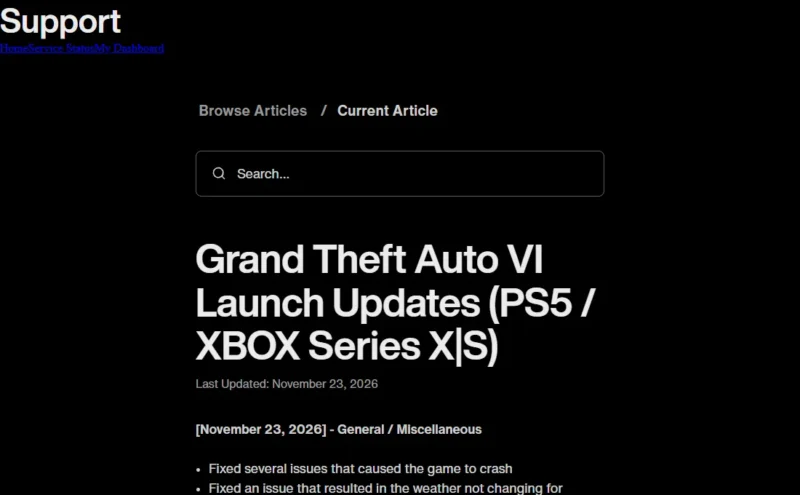
Rockstar keeps a running list of fixes on its GTA VI Launch Updates page. The November 23, 2026 update lists these fixes, among others:
- Several issues that caused the game to crash
- The game not autosaving correctly
- Phone calls not triggering, including calls that progress the story or unlock missions
- The weather not changing for long periods
- Being unable to lose your Wanted Level
So if you got stuck on a mission because a call never came, or the game crashed in the same spot every time, the update may already fix it. Before you try anything else, make sure that update has actually installed on your console.
How to fix GTA 6 crashing on PS5
PlayStation’s own page for error CE-108255-1 (“An error occurred with the game/application”) says to try updating your game. If it still crashes after updating, work through PlayStation’s game issue steps in this order:
- Restart the PS5. Press the PS button and select Power > Restart PS5.
- Update the system software. Go to Settings > System > System Software > System Software Update and Settings.
- Restore licenses. Go to Settings > Users and Accounts > Other > Restore Licenses. PlayStation lists “a game crashes” as one reason to do this, and says restoring licenses won’t affect your data.
- Move the game off USB storage. If GTA 6 sits on USB extended storage, PlayStation says to move it to internal storage. Our GTA 6 file size guide shows how much room it needs.
- Clear the cache and rebuild the database in Safe Mode. See the steps below.
- Delete and re-download the game, using a wired connection if you can. Only do this once the steps above fail, because it means downloading the whole game again.
How to clear the cache and rebuild the database on PS5
These are the steps from PlayStation’s Safe Mode guide:
- Turn off the PS5 by holding the power button for three seconds. The light blinks for a moment before it turns off.
- Press and hold the power button again. Let go after the second beep, about seven seconds after the first one.
- Connect your controller with the USB cable and press the PS button.
- Select Clear Cache and Rebuild Database. Choose Clear System Software Cache first if the game stutters or performance drops, or Rebuild Database to scan the drive and rebuild the list of all content.
Pick the right Safe Mode option. PlayStation says Repair Console Storage and Restore Default Settings don’t delete your games or saves, but Reset PS5 deletes all user data. Don’t choose it to fix a game crash.
How to fix GTA 6 crashing or freezing on Xbox Series X|S
Xbox Support currently shows a banner pointing GTA VI questions to Rockstar, while Rockstar points console errors back to Xbox. Here are Xbox’s own game issue steps:
- Check for known problems. Look at the Xbox status page for outages.
- Quit and restart the game. Press the Xbox button, highlight GTA 6, press the Menu button and select Quit. If the game is frozen and you can’t get back to Home, skip to the next step.
- Power cycle the console. Hold the Xbox button on the front of the console for about 10 seconds until it shuts off, then turn it back on. If you don’t see the green boot-up animation, repeat it. Xbox says this doesn’t erase any games or data.
- Test your network. Go to Profile & system > Settings > General > Network settings > Test network connection. Say yes if it asks to update the console.
- Try a different profile. If the game works on another profile, Xbox says your profile data may be corrupted. Remove it at Profile & system > Settings > Account > Remove accounts, then add it back with Add or switch > Add new.
Still frozen after a power cycle? Xbox also suggests a full power reset: shut the console down, unplug the power cable, wait at least 10 seconds so the power supply resets, then plug it back in and turn it on.
GTA 6 won’t download, install or start
Rockstar’s install help for PS5 and Xbox sends you to each platform’s download guide. The short version:
| Problem | PS5 fix | Xbox Series X|S fix |
|---|---|---|
| Download won’t start | Open Downloads/Uploads in the control center, then Pause and Resume. Still stuck? Cancel and Delete, then download again from your Game Library. | Check Xbox status, make sure you’re signed in with the profile that bought the game, and check for a system update. |
| Not enough space | Check the space the game needs (Game Library, select the game, then View Product) and compare it with Settings > Storage. | Xbox’s install guide lists checking storage space as a fix. See our GTA 6 storage guide. |
| Download stuck | Go to Settings > Network > Connection Status > Test Internet Connection. | Run Test network connection in Network settings. |
| Padlock on the game icon | Sign in to the account that bought the game, check your transaction history, then restore licenses. | Sign in with the correct Xbox profile. |
| Code from the box or a gift won’t work | Rockstar’s activation article points to PlayStation’s code redemption help. | Rockstar points to Xbox’s prepaid code redemption help. |
Sources: PlayStation download troubleshooting and Xbox installation troubleshooting.
GTA 6 sign-in and connection errors
Before changing settings, check whether the problem is on the server side. On November 24, 2026, Rockstar’s Service Status page listed GTA Online, Red Dead Online and shared Online Services such as Authentication, but not GTA VI as its own entry. So check the shared Rockstar services there, plus PlayStation Network status or the Xbox status page.
On PS5, these codes from PlayStation’s error code list are the ones most likely to show up around a big launch:
| PS5 code | What PlayStation says it means |
|---|---|
| CE-108255-1 | An error occurred with the game/application. Try updating your game. |
| CE-107928-7 | An error stopped the game from downloading. |
| WS-116449-5 | This service is currently under maintenance. |
| NW-102636-8 | The connection to PlayStation has timed out. |
| NP-102944-0 | Please install the latest system software. |
| WS-117224-7 | There may be a problem with your 2-Step Verification setting. |
On Xbox, type any error code into Xbox’s error code search. If an error points to your account security, our guide to setting up passkeys covers safer sign-in for your Microsoft account.
When to contact Rockstar
If GTA 6 still crashes after the latest update, a restart, restored licenses and a cache rebuild or power cycle, use Rockstar’s Submit a Request form. Note which console you use, the error code if there is one and what you were doing when it crashed. Keep an eye on the Launch Updates page too, since Rockstar adds new fixes there.
Frequently asked questions
Why does GTA 6 keep crashing on my PS5?
Rockstar’s November 23, 2026 update fixed several crash issues, so first confirm you have it. If crashes continue, PlayStation recommends updating the game for error CE-108255-1, then restarting, restoring licenses and rebuilding the database in Safe Mode.
Will rebuilding the database delete my GTA 6 save?
PlayStation describes Rebuild Database as scanning the drive and creating a new database of content. The options that delete data are Reset PS5 and Reset PS5 (Reinstall System Software), so avoid those.
Does power cycling my Xbox delete GTA 6?
No. Xbox says a full power cycle doesn’t erase any games or data. Hold the Xbox button on the console for about 10 seconds, then turn it back on.
Is GTA 6 down right now?
Check Rockstar’s Service Status page for its shared online services, plus PlayStation Network or Xbox status. As of November 24, 2026, Rockstar’s page didn’t list GTA VI as a separate entry.
Is there a GTA 6 PC version I can try instead?
No. Rockstar’s platforms page lists only PlayStation 5 and Xbox Series X|S.