

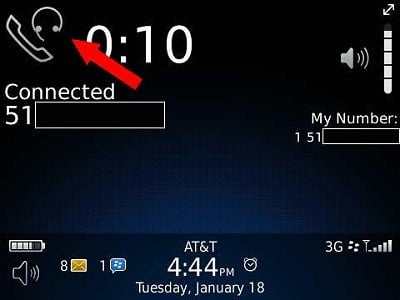
Today is gonna give you a solution in advance if you had this f$#k problem on your Android phone that stuck in headphone mode and never let you listen to anything without headphone. There is a Fix Android Stuck On Headphone Mode.
This is a problem in the headphone jack, but it can be fixed without any hardware change and spend money.
This is not such a common problem but when you had this issue you can’t listen to any phone and songs also you only listen when you plug your headphone so this is very irritating so need to fix this problem as soon as possible without any hardware change. It’s something looks like this
So here is an easy and working solution for this problem and free of coast also 😉
Fix Android Stuck On Headphone Mode
Follow this easy steps.
- Open play store and find an app named as “Htc Headphone Fix“.
- Download from Here Htc Headphone Fix.
- It is just a little app of 13kb only.
- This works fine on all android phone like Samsung and any other.
- Your problem is now fixed.
- But one thing it will keep showing that headphone logo there so doesn’t worry.
- Now try to make calls or listen to the song it works and your can listen without headphone.
If this app helps you to get rid of this problem then your ready to if not then you can do some more steps to fix this problem…
You can reset your phone sometimes there are glitches in software that creates this kind of problem and if you reset your phone to factory setting this can fix all your android problem…
But keep one thing in your mind if your headphone jack has a physical problem like there is some damage or water or some liquid inside jack this can cause physical damage…
You need to go to your service centre and if you have phone in warranty you can resolve your problem for free so all the best
So here is all about How TO Fix Android Stuck On Headphone Mode with easy steps.
Like post fell free to share anywhere and make some of the great comment down there is always waiting to listen from you.
Stay tuned for more subscribe our feed burner. 🙂


6 responses